|
Main Page
Amusements
Calendar
Certifications
Chat Room
Discussion Board
Feedback
Files
IT Health
Knowledgebase
Links
Merchandise
TechFiles
Searchers
Software
Sign GuestBook
Vaughn's Site
| |
|
RJ-45 Crossover
Cable and Straight Through Pinouts
Overview
This article provides connectivity examples for hub-to-hub,
hub-to-transceiver, transceiver-to-transceiver, pinouts and color coding for
standard ethernet cabling.
Discussion
| Crossover Cable |
| RJ-45 PIN |
RJ-45 PIN |
| 1 Rx+ |
3 Tx+ |
| 2 Rc- |
6 Tx- |
| 3 Tx+ |
1 Rc+ |
| 6 Tx- |
2 Rc- |
|
 |
| Straight Through Cable |
| RJ-45 PIN |
RJ-45 PIN |
| 1 Tx+ |
1 Rc+ |
| 2 Tx- |
2 Rc- |
| 3 Rc+ |
3 Tx+ |
| 6 Rc- |
6 Tx- |
|
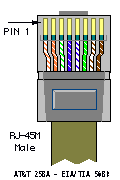
Please Note: The standard connector view shown is color-coded for a
straight thru cable assembly, when connecting Hub to Xcvr or DNI Card. When
connecting hub to hub, Xcvr to Xcvr, or DNI to DNI, the wires must crossover
at the opposite end of the cable assembly.

Interconnecting Your Hubs, Transceivers, and DNI Cards
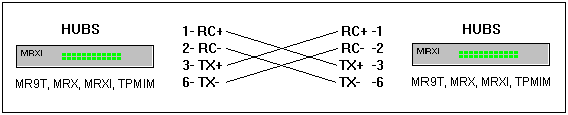
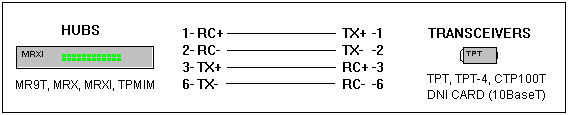
As noted in the illustrations below, a crossover cable is required when
connecting a Hub to a Hub, or a Transceiver to Transceiver, or DNI to DNI
card, or Transceiver to DNI card. When connecting a Hub to a transceiver or
DNI card, a straight through cable is always used. Please Note: Some
Cabletron products are equipped with internal switches that can internally
cross the twisted pairs.
In these illustrations a Hub can refer to any standalone product, such as
the SEHI or MicroMMAC; or concentrator modules in MMAC-FNB or MMACPLUS hubs,
such as a TPMIM-xx, TPRMIM-xx or 9E132-15. To note the differences between
Ethernet, Token Ring and FDDI/ATM connectivity, refer to the
Wiring Color Code Standards.
Hub to Hub Connectivity

Hub to Transceiver or DNI Card Connectivity

Transceiver to DNI Connectivity

Standard Ethernet Cable Part Numbers
| 9360005-xx |
Straight Through Cable, Cat 5 |
Hub to Xcvr or DNI |
| 9360141-xx |
Straight Through Cable, Cat 3 |
Hub to Xcvr or DNI |
| 9360034-xx |
CrossOver Cable, Cat 3 |
Hub-Hub, Xcvr-Xcvr, DNI-DNI |
| 9360169-xx |
CrossOver Cable, Cat 5 |
Hub-Hub, Xcvr-Xcvr, DNI-DNI |
Category 5 wiring standards:
EIA/TIA 568A/568B and AT&T 258A
define the wiring standards and allow for two different wiring color
codes.
| Pin # |
EIA/TIA 568A |
AT&T 258A, or EIA/TIA 568B |
Ethernet 10BASE-T |
Token Ring |
FDDI, ATM, and TP-PMD |
| 1 |
White/Green |
White/Orange |
X |
|
X |
| 2 |
Green/White |
Orange/White |
X |
|
X |
| 3 |
White/Orange |
White/Green |
X |
X |
|
| 4 |
Blue/White |
Blue/White |
|
X |
|
| 5 |
White/Blue |
White/Blue |
|
X |
|
| 6 |
Orange/White |
Green/White |
X |
X |
|
| 7 |
White/Brown |
White/Brown |
|
|
X |
| 8 |
Brown/White |
Brown/White |
|
|
X |
- Pairs may be solid colors and not have the stripe.
- Category 5 cable must use Category 5 rated connectors.
|
100baseT Straight Cable (PC to HUB/SWITCH)
Straight cables are used to connect PCs or other equipment to a HUB or
Switch. If your connection is PC to PC or HUB to HUB you MUST use a Crossed
cable.
The following cable description is for the wiring of BOTH ends (RJ45 Male
connectors) with your category 5 wiring colors (TIA/EIA 568A or 568B though the
example uses 568B colors).
| Pin No. |
strand color |
Name |
| 1 |
white and orange |
TX_D1+ |
| 2 |
orange |
TX_D1- |
| 3 |
white and green |
RX_D2+ |
| 4 |
blue |
BI_D3+ ** |
| 5 |
white and blue |
BI_D3- ** |
| 6 |
green |
RX_D2- |
| 7 |
white and brown |
BI_D4+ ** |
| 8 |
brown |
BI_D4- ** |
We use BLUE for 100baseT straight cables.
NOTE 1: Wires marked ** are ABSOLUTELY NECESSARY for 100Base-T4
networks (using any combination of category 3/4/5 cables) but are not required
for 100Base-TX (using cat 5/5e ONLY cables) and CAN be used for other purposes
e.g. telephony
NOTE 2: All our wiring is now done to the 100baseT spec which you can
use with 10baseT networks - but NOT the other way around.

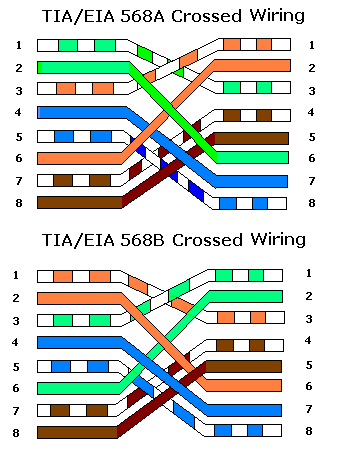
100baseT Crossed cable (PC to PC or HUB to HUB)
Crossed cables are used to connect PCs to one other PC or to connect a HUB to
a HUB. If your connection is PC to HUB you MUST use a Straight cable.
The following description shows the wiring at both ends (male RJ45
connectors) of the crossed cable.

We use RED for crossed cables (or more
commonly now a red heat-shrink collar at each end). NOTE: All our crossed wiring
is now done to the 100baseT spec which you can use with 10baseT networks - but
NOT the other way around.
| GIGABIT ETHERNET (1000BASE-T)
CROSSOVER |
| Plug A |
Plug B |
| Pin
# |
Signal |
Conductor Color
Code |
Pin
# |
Signal |
Conductor Color
Code |
| 1 |
BI_DA+ |
white/green |
1 |
BI_DA+ |
white/orange |
| 2 |
BI_DA- |
green |
2 |
BI_DA- |
orange |
| 3 |
BI_DB+ |
white/orange |
3 |
BI_DB+ |
white/green |
| 4 |
BI_DC+ |
blue |
4 |
BI_DC+ |
white/brown |
| 5 |
BI_DC- |
white/blue |
5 |
BI_DC- |
brown |
| 6 |
BI_DB- |
orange |
6 |
BI_DB- |
green |
| 7 |
BI_DD+ |
white/brown |
7 |
BI_DD+ |
blue |
| 8 |
BI_DD- |
brown |
8 |
BI_DD- |
white/blue |
| Legend:
N/U - Not used. May be either short or open circuit
|
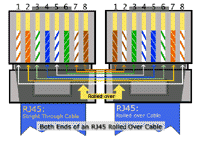
Rolled Cable
{Cisco speak}
In a rolled cable, the colored wires at one end of the cable are in the
reverse sequence of the colored wires at the other end of the cable.the
8-port RJ-45 adapter that is used with the Cisco 2509, 2510, 2511, and 2512, is
the same as a rolled cable
Rolled Cable

|